Purchase Orders Workflow
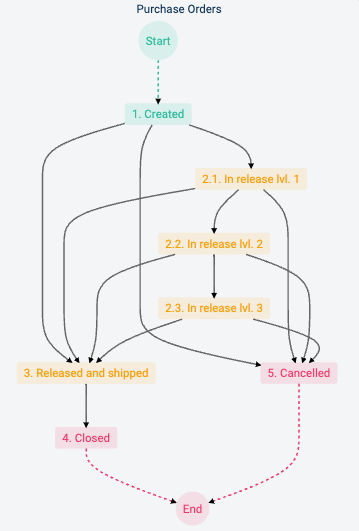
Description of the different states or stages of the process:
Created: The workflow initiates with the creation of the purchase order by an authorized user. If the purchase cost is equal to or greater than the indicated amount of the first release level, then the workflow passes to the In Release Level 1 state for approval. But if the purchase cost is below the indicated amount of the first release level, then the purchase order is automatically approved, and the workflow passes to the Released and Shipped state.
Release Levels: All release levels are configured with a cost value and a designated releaser that can approve or reject the purchase order.
2.1. In Release Level 1: All purchases equal to or greater than the minimum set cost pass through this release level first. Purchase orders below the second level release value pass on to the Released and Shipped state, otherwise, they go to In Release Level 2.
2.2. In Release Level 2: This is the release level for all purchases that are equal to or greater than the second level cost value and that were approved in the previous release level. If the purchase order is approved and its cost value is less than the third level cost value, than it moves onto the Released and Shipped state, otherwise, it goes on to the In Release Level 3 state.
2.3. In Release Level 3: Purchase orders approved in the previous two states and with a cost value equal to or greater than third level's set value, pass through this level for approval.
Released and Shipped: Once the purchase order is fully approved, it goes on to this state. Upon entering this state, the purchase order is automatically generated as a PDF document and sent to the supplier via email. During this state, designated users are added to the workflow to register the reception of goods and services. Furthermore, designated users are added to register invoice and billing information. If deliveries are segmented, reception and billing information are stored and added to each consecutive delivery.
Closed: From the Released and Shipped state, the purchase order can be closed by a supervisor or the user that initiated the purchase order. Closure comes after the registration of received goods and services along with their billing information. If goods or services are received in partial deliveries or not in their totality, closure can be carried out once all received items and invoices are registered.
Cancelled: The purchase order is cancelled any time it is rejected while in the release levels.