Service Orders Workflow
After the service order has been created, it is sent to a supervisor or coordinator for its release approval. In the channel workspace, supervisors can review the service order and then must indicate their approval or rejection by filling out the release form.
The service order is generated in PDF format and made available through the channel workspace upon acceptance.
Accessing the Form
To access the service order and fill out the release form:
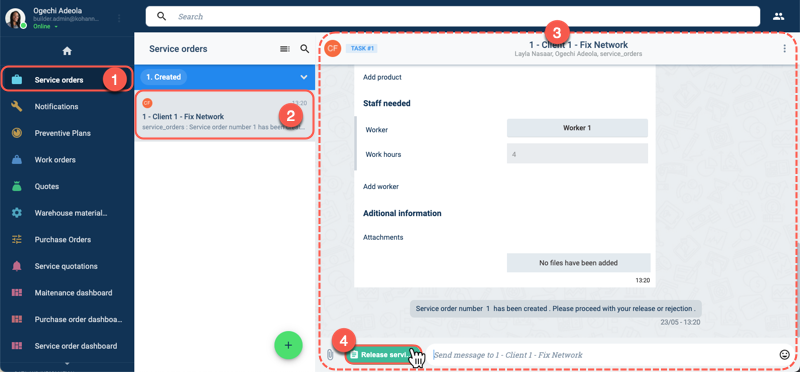
- Press Service orders from the Main Menu Bar.
- In the Service orders panel, choose the created service order to review.
- The service order's channel workspace opens up. In it, all the details of the service order can be found.
- Press the Release service order button found at the bottom of the channel workspace to open the release form.
Form Layout
The release form appears as shown below:
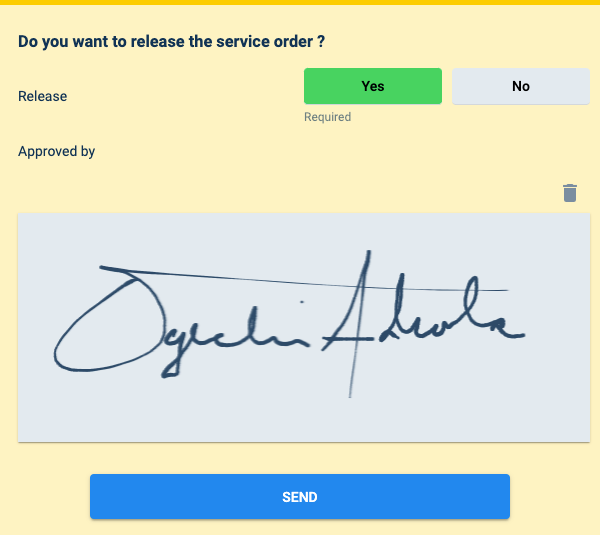
Answering Yes takes the workflow to the next stage. If the service is not released, the workflow is closed, and the job is not performed.
The supervisor's signature is also required and will be included in the autogenerated PDF document of the service order.