Service Orders Workflow
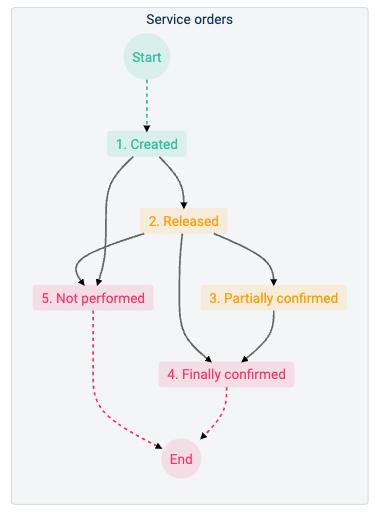
Description of the different states or stages of the process:
- Created: The first state is initiated with the creation of a service order using the Create Service Order form. Once created, the Release Service Order form is made available so supervisors can approve the service order for release and pass it on to the next stage (Released). The service order can also be rejected and sent to the Not performed state.
- Released: Once in the released state, field workers can be incorporated into the workflow. Field workers can use the fast close form to confirm that the job was completed as indicated in the service order, passing the process to the Finally confirmed state. They can also pass the to the Partially confirmed state by submitting the Create confirmation form if they need to apply modifications to the service order. If the job was not performed, the field workers can pass the service order into the Not performed state by selecting the respective option.
- Partially confirmed: Service orders that field workers or other involved stakeholders have modified after they were released are found in this state. Those involved can resubmit the Create confirmation form as many times as necessary, and once finished, they can close the service order through the same form.
- Finally confirmed: All service orders that have been completed, with or without modifications after release, are sent to this state.
- Not performed: Service orders that were rejected by supervisors or not initiated by field workers after release are found here.