Preventive Plans Workflow
With this form, you can create and configure a preventive maintenance plan for one of your assets.
Access the Form
To open the form:

- On the Main Menu Bar, go to Preventive Plans.
- From the Preventive Plans panel, select Create Preventive Plan.
- Press the Create Preventive Plan found at the bottom of the channel workspace to open the form shown below.
Form Layout
General Layout
Below is the initial view of the Create a New Preventive Plan form:

The form is associated with your company's master data, making lists of equipment and users available in the corresponding fields.
The Checklist, a survey with maintenance requirements for equipment, must be previously created. Visit the Create Survey Tutorial or the Admin Docs for more information on surveys.
Time-Based Plan
When you select to create a time-based plan, the following fields will appear:
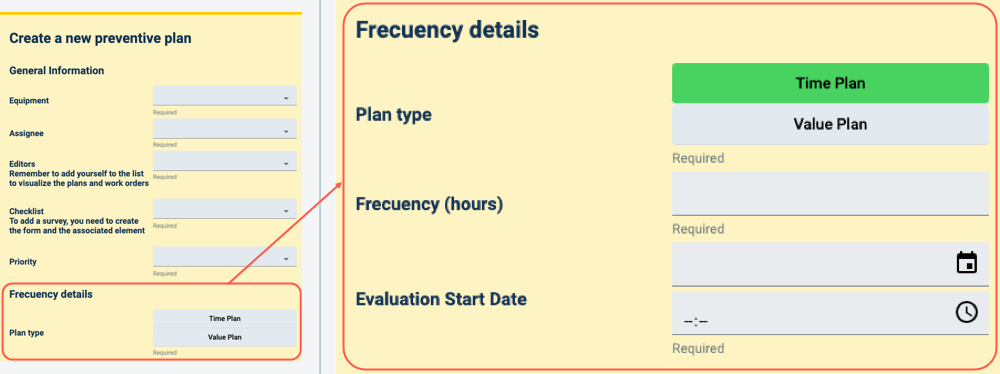
Remember that frequency is measured in hours. For example, daily checks require a value of 24; weekly checks, 168; monthly checks, 730; yearly checks, 8760; and so forth.
Value-Based Plan
When you select to create a value-based plan, the following fields will appear:

- In the units field, specify the metric's unit system, e.g., miles, kilometers, gallons, liters, etc.
- Frequency indicates the metric value intervales to prompt a maintenance check.
- Current value is the value the equipment or asset's metric is currently at. This value will be constantly updated by the assignee.
- Initial reference value indicates the metric's value the last time a maintenance check was performed, i.e., the value the planner starts counting from.