Work Orders Workflow
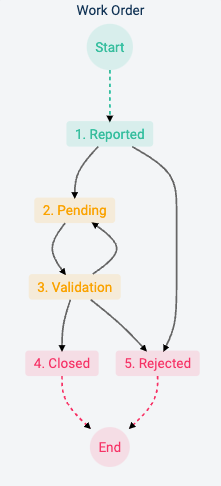
Workflow States (process steps):
- Reported: Either a supervisor or a bot has filled out and submitted the Create Work Order form. Technical teams and contractors are informed of the work order. They can now review the information, ask for more details, and view its history. To pass to the workflow's next step, a technical team or contractor must accept the work order by submitting the Accept Work Order form.
- Pending: The work order has been accepted by a technical team or contractor, and now they must complete the job. During this part of the process, contractors can send a quote for review, commencing a parallel workflow.
- Validation: Once the job has been completed, workers send the Close Work Order form, thus commencing the Validation step of the workflow. Now, supervisors must validate the job by submitting the Acceptance of Work form. If it is not validated, the workflow goes back to pending. Otherwise, it passes to the closed state.
- Closed: If the supervisor validates the completion of the job, then the workflow passes to the Closed state, thus ending the workflow.
- Rejected: This state is not used in the current workflow, but left in place for future customizations.