Purchase Orders Workflow
Overview
Depending on the company area in which the purchase order was created, a specific set of release strategy rules is applied to carry out the approval process before sending the purchase order to a supplier. The workflow is currently set to carry purchase order requests through up to three release levels for approval if they fall within certain cost ranges. Cost ranges can be easily set to your company's needs. Each release level counts with an assigned user to review purchase orders for approval.
Access Release Strategy Settings
Authorized users can configure the release strategy settings as follows:
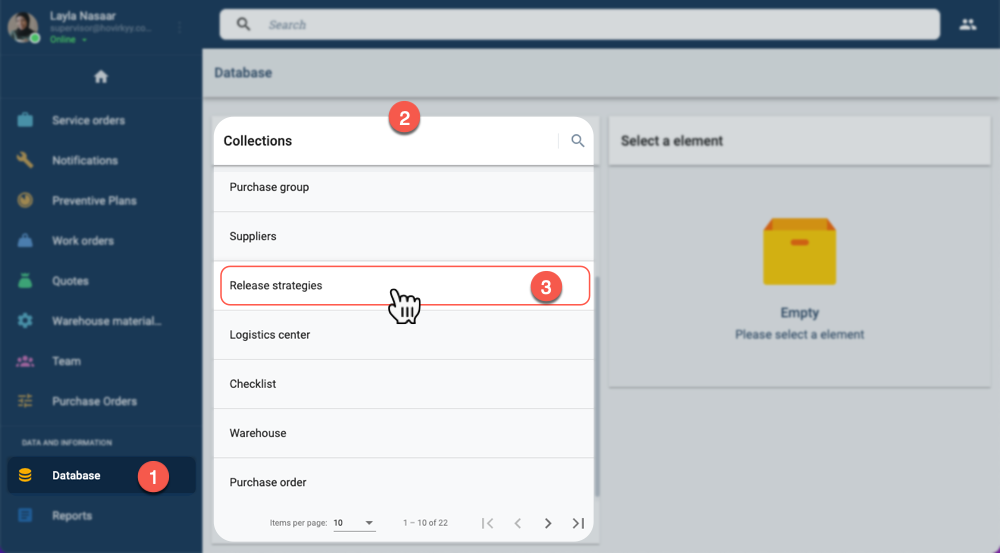
- On the Main Menu Bar, select Database to open the Database Collections panel.
- In Database Collections panel, choose Release strategies to open the settings panel.
Once the Release strategies item has been selected:
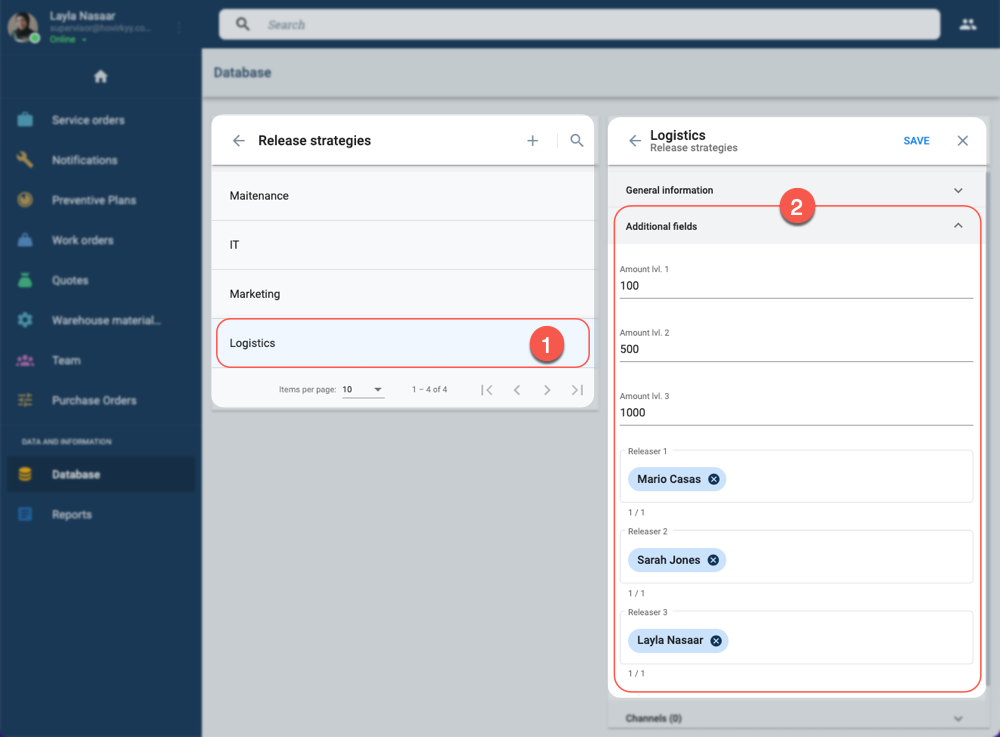
- In the Release strategies panel, chose the company area you which to configure to open the corresponding settings panel.
- From the company area's settings panel, go to the Additional Fields tab to modify Amount Levels and Releasers.
Level Cost Amounts
The release strategy is guided by amounts set for purchase costs. By default, the purchase order workflow includes three release levels. Each release level has a minimum cost amount. If a purchase is equal to or above a set amount, it must pass through all the corresponding release levels for approval.
Let's say we have a release strategy that has its level amounts set at 100, 500, and 1000, respectively. If a purchase has a total cost of $900, it must sequentially pass through the first and second release levels for approval.
Rejection in any of the release levels completely cancels the purchase order.
Releasers
Releasers, i.e., users designated to review purchase orders for approval, are configured by company area. Meaning that each company area can have its own releasers for every release level.
When a purchase order request arrives at a release level, the corresponding releaser is automatically added to the channel. Once in the channel, they can view all the data and submit the Release Purchase Order form. Once they submit the form, whether they approved or rejected the order, they are automatically removed from the channel.
Related Topics
- Release Form: Survey form used by releasers to approve or reject a purchase order request.
- Workflow Description: Describes how release levels act within the Purchase Orders Workflow.